
Frequently Asked Questions
Everything you need to know about Device Charger's powerbank rental kiosks — for venue managers and guests alike.
Can't find your answer here? Contact our UAE team directly:
+971 (0)56 523 5234
contact@devicecharger.ae
For Venue Managers and Business Owners
How much does it cost to get a Device Charger kiosk for my venue?
Nothing. Device Charger installs, maintains and restocks your kiosk at zero cost to your venue. There is no purchase price, no monthly placement fee and no hidden charges. Our revenue comes from guest rentals — a percentage of which we share with you. You never pay us anything.
How does the revenue share work?
Every time a guest at your venue rents a powerbank, a rental fee is charged directly to the guest. Device Charger collects that fee and splits it with your venue according to the agreed revenue share percentage. You receive a monthly payment along with a full itemised report showing total rentals, gross revenue and your share. The percentage is agreed before installation and does not change without your consent.
Can my bar, restaurant or hotel actually earn money from a phone charging station?
Yes — and in practice, the earnings can be significant depending on your footfall. A busy Dubai restaurant with 200 covers per service, a hotel lobby handling several hundred guests per day, or a nightclub with high weekend attendance will each generate a meaningful volume of rentals. Because the kiosk is self-service and requires no staff involvement, the revenue is entirely passive. When you apply, our team will model a revenue estimate specific to your venue based on your footfall data and venue type.
Do I need wifi or special electrical infrastructure for the kiosk?
Yes, the kiosk requires a stable WiFi connection to operate correctly. No special electrical infrastructure is needed; a standard power outlet is sufficient.
Who handles maintenance and restocking?
Device Charger does — entirely. Our team monitors every kiosk remotely around the clock. If a unit requires attention, we are alerted automatically and arrange a visit. Restocking of powerbanks is tracked in real time and managed proactively. Your staff are never asked to handle any aspect of kiosk operation, maintenance or restocking.
Is there a contract? What are the terms?
Yes, we formalise the partnership with a written agreement that sets out the revenue share percentage, service commitments, placement terms and exit conditions. We believe in clear, fair terms — not small print designed to lock you in. The specific terms are discussed during the partnership process, before any agreement is signed. There is no obligation to proceed after the initial site survey.
How quickly can a kiosk be installed at my venue?
The installation timeline should be adjusted to reflect that a kiosk can be installed within a maximum of two weeks.
What size kiosk is right for my venue?
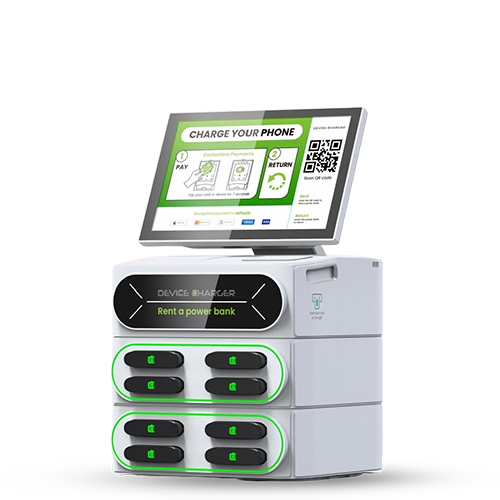
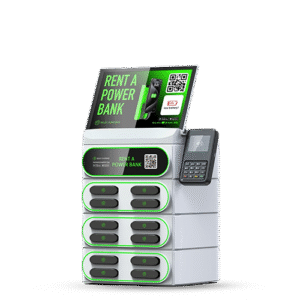
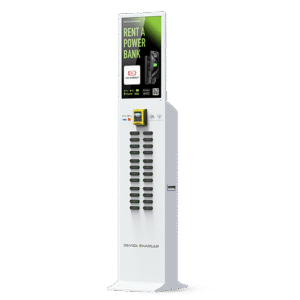
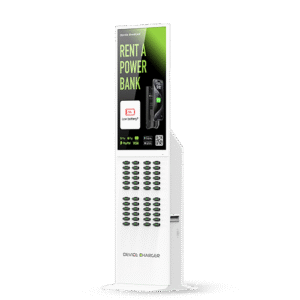
Device Charger offers four kiosk sizes:
- DC-08BPB — 8 powerbank slots. Ideal for smaller venues such as boutique cafes, bars and gyms with lower daily footfall.
- DC-12BPB — 12 powerbank slots. Best suited to restaurants, cafes, coffee shops and mid-size bars.
- DC-24BPB — 24 powerbank slots. Designed for higher-footfall environments including nightclubs, beach clubs, hospitals and conference venues.
- DC-48BPB — 48 powerbank slots. Built for maximum-capacity locations such as shopping malls, airports, exhibitions and metro stations.
Our team recommends the right unit based on your estimated daily footfall during the site survey. [See the full product range]
Can I have more than one kiosk across my property?
Absolutely. Hotels, hospitals and larger venues often benefit from multiple kiosks placed at different high-traffic points — lobby, restaurant, pool deck, outpatient waiting area and so on. Multi-unit placements are discussed during the partnership process and are reflected in the overall revenue share arrangement.
Can the kiosk be branded with my venue's logo or colours?
Yes. Kiosk wrapping, stand branding and on-screen content can be customised to reflect your brand identity, interior palette or promotional messaging. The Kiosks and stands themselves can also be fully wrapped and branded. The Kiosk screen can display your own offers, social channels or menu specials. Customisation options are discussed during the partnership process.
What if a guest walks out without returning the powerbank?
A security deposit is held at the time of rental. If the powerbank is not returned within 23 hours, the security deposit will be kept. Once the powerbank is returned within 23 hours, the security deposit will be released back to the customer.
What information do I need to apply?
Just the basics — your name, role, venue name, venue type, emirate, approximate location and estimated daily footfall. The application takes under two minutes. [Apply here]
I manage multiple venues across the UAE. Can Device Charger work with all of them?
Yes. We actively work with hospitality groups and operators managing multiple sites. A group partnership discussion covers all locations together and allows for consistent terms across your portfolio. Contact our team directly to discuss a multi-venue arrangement.
For Guests Renting a Powerbank
How do I rent a powerbank from a Device Charger kiosk?
No app and no account are required. Approach the kiosk, follow the on-screen instructions, tap your card or phone to pay, and take a powerbank from the slot. The whole process takes under 30 seconds. Cables for all device types — USB-C, Lightning and Micro USB — are built into the powerbank itself.
Do I need to download an app to use Device Charger?
No. Unlike some other powerbank rental services in the UAE, Device Charger requires no app download and no account registration. You pay directly at the kiosk using your card, Apple Pay or Google Pay and take a powerbank immediately.
Which devices are compatible?
Device Charger powerbanks are designed for charging smartphones only. Each Device Charger powerbank includes built-in cables for:
- USB-C — compatible with most Android devices, newer iPhones (iPhone 15 and above).
- Apple Lightning — compatible with iPhone 14 and below, and older AirPods cases
- Micro USB — compatible with older Android devices and various accessories
If you are unsure, check the charging port on your device — one of the three cable types will fit.
How much does it cost to rent a powerbank?
Rental rates are set per venue and displayed on the kiosk screen before you confirm your rental. There is no hidden fee. You pay only what is shown on screen.
How long can I keep the powerbank?
You can keep the powerbank for the duration of your visit to the venue. When you are ready to leave, return it to any available slot on the kiosk. If you need to keep it longer, the rental continues until it is returned — charges accumulate according to the rate displayed at the time of rental.
Where do I return the powerbank?
Return the powerbank to the same kiosk you rented it from, or to any other Device Charger kiosk if one is available nearby. Insert the powerbank into any open slot until it clicks and the screen confirms the return.
What if the powerbank does not charge my device?
First, ensure the cable is fully inserted into your device and the powerbank is switched on. If the problem persists, return the powerbank to the kiosk and contact Device Charger support via the details on the kiosk screen or at contact@devicecharger.ae. A refund or replacement will be arranged.
What if I lose the powerbank or forget to return it?
If a powerbank is not returned within the rental period, your card will be charged a replacement fee as set out in the rental terms displayed at the time of rental. To avoid this, simply return the powerbank to any Device Charger kiosk before leaving the venue.
Where can I find Device Charger kiosks in the UAE?
Device Charger kiosks are located across hotels, restaurants, bars, beach clubs, hospitals, gyms and other venues throughout the UAE. The fastest way to find a kiosk near you is to look for the Device Charger unit when you enter a participating venue — kiosks are typically positioned near the entrance, host station or lobby.
Common Questions from Venue Managers
Is the kiosk safe to operate in a hospital environment?
Yes. All Device Charger hardware is CE-certified and designed for safe operation in high-traffic public environments. The kiosks operate from a standard power socket and do not emit signals that interfere with medical equipment. For any specific compliance requirements, our team is happy to provide technical documentation during the site survey process.
Does the facility need to provide wifi?
WiFi connectivity supports remote monitoring and real-time reporting but is not mandatory for the kiosk to dispense powerbanks and process guest rentals. The kiosk can operate in offline mode.
Who is responsible if a patient damages the kiosk?
Device Charger retains ownership of and responsibility for all hardware. Any damage caused by third parties is covered under our operational insurance — not the facility's liability.
Can the kiosk be placed in a secure or restricted area of the hospital?
Our team will work with your facilities and security management to identify placement options that meet your access requirements. Kiosks are typically placed in public-access areas but can be configured for staff-only zones if required.
How does revenue share work for a healthcare facility?
Exactly the same as any other venue partner. Every patient or visitor rental generates a fee, a percentage of which is paid to your facility monthly. [Read the full revenue share guide]
What if a patient or visitor cannot operate the kiosk themselves?
The kiosk is designed to be as simple as possible — tap and take. However, if a patient requires assistance, any member of your visitor-facing staff can guide them through the process in under 30 seconds. No training is required.
Questions from Hospitality Venue Managers
Will the kiosk disrupt our interior design?
The kiosk has a clean, neutral design that fits naturally into most venues. The digital screen can display your own branding, promotions or visuals, allowing the unit to blend seamlessly with your interior style. This gives you full control over how the kiosk looks in your space without needing physical wrapping or multiple finish options.
Do we need to train our staff?
No. The kiosk is entirely self-service for guests. Your team do not need to be involved in rentals, maintenance or restocking.
What if a guest walks out with a powerbank?
The rental agreement between the guest and Device Charger covers unreturned powerbanks. This is not your venue's liability and does not affect your revenue share.
How do guests pay?
Guests pay directly through the kiosk using a card or mobile payment. Payments are processed by Device Charger — your venue receives no cash and has no payment handling responsibility.
Is there a minimum footfall requirement?
We assess each venue individually. As a general guide, venues welcoming 100 or more guests per day are strong candidates. We will give you an honest assessment during the site survey.
Can we have kiosks in multiple locations across our property?
Yes. Hotels and larger venues often benefit from kiosks in the lobby, restaurant and pool area. Multiple unit placements are discussed during the partnership process and reflect your footfall distribution.
Questions from Nightlife Venue Managers
Will the kiosk disrupt our interior design?
The kiosk has a clean, neutral design that fits naturally into most venues. The digital screen can display your own branding, promotions or visuals, allowing the unit to blend seamlessly with your interior style. This gives you full control over how the kiosk looks in your space without needing physical wrapping or multiple finish options.
Do staff need to be involved?
No. The kiosk is fully self-service.
What if a guest walks out with a powerbank?
The rental agreement covers unreturned powerbanks. This is not your venue’s liability.
How do guests pay?
Directly through the kiosk using card or mobile payment.
Is there a minimum footfall requirement?
Venues with 150+ nightly guests typically perform best, but we assess each venue individually.
Can we place multiple kiosks?
Yes — especially for large clubs with multiple bars or zones.
Questions from Transport Hub Managers
Will the kiosk cause crowding?
No. The units are compact and placed strategically to avoid congestion.
Do staff need to assist travellers?
No. The kiosk is fully self-service.
What if a traveller leaves with a powerbank?
The rental agreement covers unreturned units. This is not your liability.
Does the kiosk require WiFi?
WiFi improves reporting but is not required for rentals.
Is the hardware safe for public transport environments?
Yes. All units are CE-certified and designed for high-traffic areas.
Can we install multiple kiosks across a network?
Yes — airports, metro networks and large terminals often deploy multiple units.
Questions from Transport Hub Managers
Will the kiosk cause crowding?
No. The units are compact and placed strategically to avoid congestion.
Do staff need to assist travellers?
No. The kiosk is fully self-service.
What if a traveller leaves with a powerbank?
The rental agreement covers unreturned units. This is not your liability.
Does the kiosk require WiFi?
WiFi improves reporting but is not required for rentals.
Is the hardware safe for public transport environments?
Yes. All units are CE-certified and designed for high-traffic areas.
Can we install multiple kiosks across a network?
Yes — airports, metro networks and large terminals often deploy multiple units.
Common Questions for Guests
Do I need to download an app to rent a powerbank?
No. Device Charger requires no app and no account. Tap your card or phone at the kiosk and take a powerbank immediately.
How much does it cost to rent a powerbank?
Rates vary by venue and are displayed clearly on the kiosk screen before you confirm your rental. You always see the price before you pay.
What if I cannot find a kiosk?
Device Charger kiosks are located at the entrance, lobby or host station of participating venues. If you are unsure, ask a member of venue staff — they will be able to point you to the kiosk.
What if a guest doesn’t return a powerbank?
A security deposit is held at the time of rental. If the powerbank is not returned within 23 hours, the security deposit will be kept. Once the powerbank is returned within 23 hours, the security deposit will be released back to the customer.
Common Questions for Venue Managers
Is there really no cost to my venue?
Correct. Device Charger installs, maintains and restocks the kiosk entirely at our own cost. You never pay us anything.
How long does installation take?
Once your venue is confirmed and the agreement is signed, installation typically takes place within two to three weeks. Our team handles everything.
What if I have more questions?
Visit our [full FAQ page →] or contact our UAE team directly on +971 (0)56 523 5234.
Questions About Our Kiosks
Do the kiosks require WiFi?
Yes, WiFi is required for the kiosk to operate correctly, including rentals, returns, reporting and remote monitoring.
How do guests pay?
Directly at the kiosk using card or mobile payment.
Can the kiosks be branded?
Yes — the screen can display your promotions, menus or campaigns.
What if a guest doesn’t return a powerbank?
The rental agreement covers unreturned units. This is not your liability.
How do I know which model is right for my venue?
Our team recommends the ideal unit based on your footfall during the site survey.
Common Questions from Venue Managers
Is there a contract?
Yes — we work with venue partners on a formal partnership agreement that sets out the revenue share percentage, terms of service and exit conditions. We believe in transparency, not small print.
Who is responsible for the kiosk?
Device Charger retains ownership of and responsibility for all hardware. Maintenance, restocking and technical support are entirely our responsibility.
Do I need wifi or special electrical infrastructure?
No special electrical work is required. Our kiosks operate from a standard UAE power socket. WiFi is required for the kiosk to operate correctly, including rentals, returns, reporting and remote monitoring.
How quickly can a kiosk be installed?
Once your venue is approved and the partnership agreement is signed, installation is completed within a maximum of two weeks. Our team handles the full process from delivery, placement, commissioning and testing , so your kiosk is fully operational and generating revenue from day one.
What size kiosk is right for my venue?
We offer four kiosk sizes — 8, 12, 24 and 48 powerbank slots. Our team will recommend the right unit based on your estimated daily footfall during the site survey.
Can I have more than one kiosk?
Absolutely. Larger venues such as hotels, hospitals and malls often benefit from multiple units placed at different points — lobby, restaurant, pool deck, and so on. This is discussed and agreed during the partnership process.
Can the kiosk be branded with my venue's logo?
Yes. Kiosk wrapping and screen content can be customised to reflect your brand identity. This is included as part of the partnership discussion.
What happens if a guest damages or loses a powerbank?
The rental agreement between the guest and Device Charger covers loss and damage. This is not your venue's liability.
Still Have a Question?
Our UAE team is available to help — whether you are a venue manager exploring a partnership or a guest with a question about your rental.
+971 (0)56 523 5234
contact@devicecharger.ae
